
AGENDA MANAGEMENT
Drag-and-drop event agenda builder
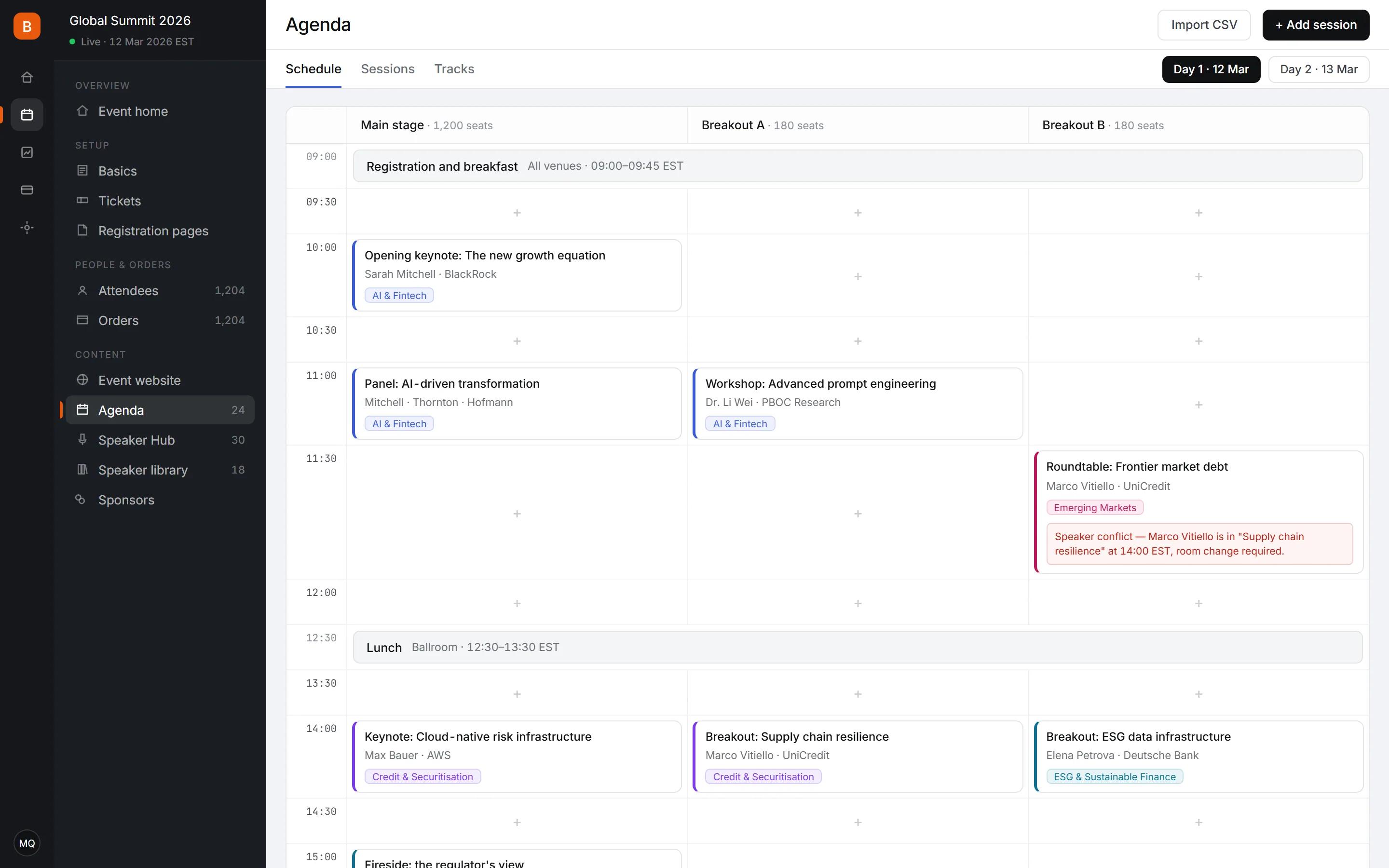
Key features
Schedule view
Sessions sit on a room × time matrix that you rearrange by dragging. The shape of the day is visible at a glance instead of buried in a spreadsheet.
Conflict detection
Double-booked rooms and speakers scheduled in two places are flagged the moment you create the clash, rather than being discovered on site.
Track management
Group sessions into topic tracks with colour coding so parallel programming stays readable. Attendees can filter the public agenda by track.
Multiple views
Switch between the schedule grid, a flat session list, and a per-track view depending on the job. Each view edits the same underlying data.
Public agenda
The agenda section of your event website updates from the same data, so a change to a session time is reflected publicly without a second edit.
Import and export
Bulk-load a programme from CSV when it was drafted elsewhere, and export the finished agenda for print or partner use.
How it works
- 1
Set rooms and slots
Define your rooms and time slots to create the scheduling grid.
- 2
Drag sessions in
Place sessions on the grid. Clashes are flagged as you go.
- 3
Publish
The public agenda on your event site updates from the same data.
Frequently asked questions
Yes. Sessions are placed on a room × time grid, so parallel tracks are laid out visually. Tracks can be colour coded and attendees can filter the public agenda by track.
Yes. Room double-bookings and speakers scheduled in two sessions at once are flagged in real time as you place sessions, not after the fact.
Yes. The agenda section of your event site reads the same data, so changing a session time updates the public agenda without a separate edit.
Yes. CSV import loads sessions, times, rooms, and speakers in bulk, which is faster when the programme was drafted outside the platform.
Attendees browse and filter the published agenda by track and time on your event website. Session details, speakers, and rooms are all shown there.
The public agenda reflects the change immediately, and so does each attendee's personal schedule in their attendee hub, so nobody is left with a stale time.
Field guides
- How do you build a multi-track agenda that does not collide?The three kinds of collision in a parallel programme, how to find them before attendees do, and what to measure so next year's grid is better.
- How do you track who attended which session at a conference?Session capture is a different problem from check-in, and the difference is exit. Collection points, sizing session doors, and what the data is really worth.
0% platform fee on every plan — from $99 a month billed annually, with a 14-day free trial, no credit card, fair use on paid tickets (50 registrations / $500).
See pricingReady to run your next event?
Get started in minutes — or try the live demo to see what your attendees get.
- No credit card required
- GDPR-ready
- Multi-currency